
Linking Lightspeed
Learn how to link your Lightspeed account to kinfo.
Lightspeed is a very popular clearing firm used by many popular introducing brokers.
They offer competitive volume pricing for active day traders, and the popular Sterling Trader Pro platform as well as their own web and mobile platforms.
You can link Lightspeed to kinfo via Wedbush to enable automatic updates of trades and performance.
Kinfo works great with Lightspeed! The integration enables end-users to track their trading performance in a meaningful way using both the mobile app and web version of kinfo.
Linking guide
The link works via Wedbush which is the clearing firm used by Lightspeed.
This guide will provide you with information about how to link your Wedbush ClientLink account.
About Security
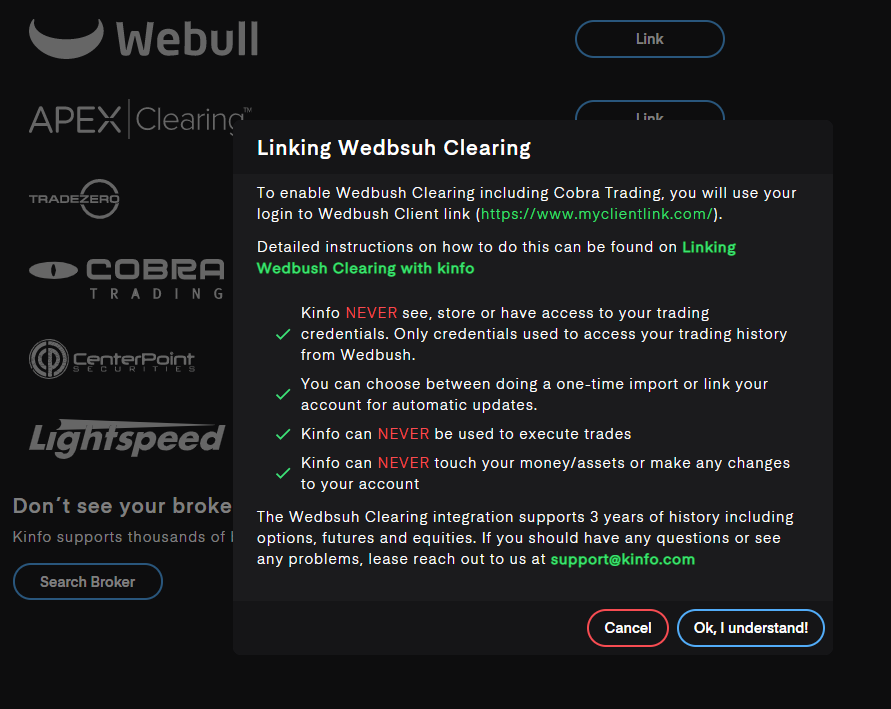
In order to use kinfo with Lightspeed, you will use your login to Wedbush ClientLink https://www.myclientlink.com/
The access provided by these credentials is limited to reading data about your trading history and open positions.
With this method, you will never share your actual broker credentials with kinfo and the integration is only granted access to read transaction data in order to calculate trades and performance metrics.
Since the kinfo user is granted access, the following applies:
- Kinfo NEVER sees, stores or has access to your real Lightspeed broker credentials
- You can choose between doing a one-time import or link your account for automatic updates.
- Kinfo can NEVER be used to execute trades
- Kinfo can NEVER touch your money/assets or make any changes to your account
Linking Lightspeed on kinfo
Wedbush login
If you don't have a Wedbush login yet, follow the registration process on https://www.myclientlink.com/ to obtain a login & password to Wedbush ClientLink.
Link on kinfo
Select Lightspeed from the list of brokers.
Use the same credentials as you use to login to Wedbush ClientLink.
Note that these are different from your Lightspeed trading credentials.
Track your trading performance
If you completed the steps above your account should be linked to kinfo and the platform will start tracking your trading performance.
When linking, the platform will initially import all history and try to calculate retroactive performance based on transactions.
Going forward, trading performance will be updated daily.
Trades & performance are tracked based on closed out trades and when corresponding buy & sell transactions can be found. If you suspect any errors or have any questions, feel free to reach out on support@kinfo.com
Good luck with your trading!