
Broker Promotion
Get kinfo PRO+ for free by promoting the broker you already trade with on your public profile.
Trade with a partner broker, get PRO+ on the house
If you trade with one of our partner brokers, you can run kinfo PRO+ at no cost. The deal is simple: show that broker on your public profile and mention it once on social. The broker covers your PRO+ in return for the exposure, and it stays free for as long as your promotion is live.
How it works
- 1Open a new account with a partner broker using the link provided on the kinfo platform.
- 2Connect the broker to kinfo so your trades import and stay verified.
- 3Make your profile public and turn on the leaderboard so other traders can find you.
- 4Enable the promotion for that broker in your settings. Your profile starts showing the offer.
- 5Post about the broker on social at least once. A post that links to your kinfo profile works.
That is it. Once the promotion is active and the requirements below are met, kinfo PRO+ is free.
What you need
- The promoted broker is linked to your kinfo account.
- Your profile is public and listed on the leaderboard.
- You have placed at least one trade in the last 30 days.
- You have posted about the broker on social at least once.
What shows on your profile
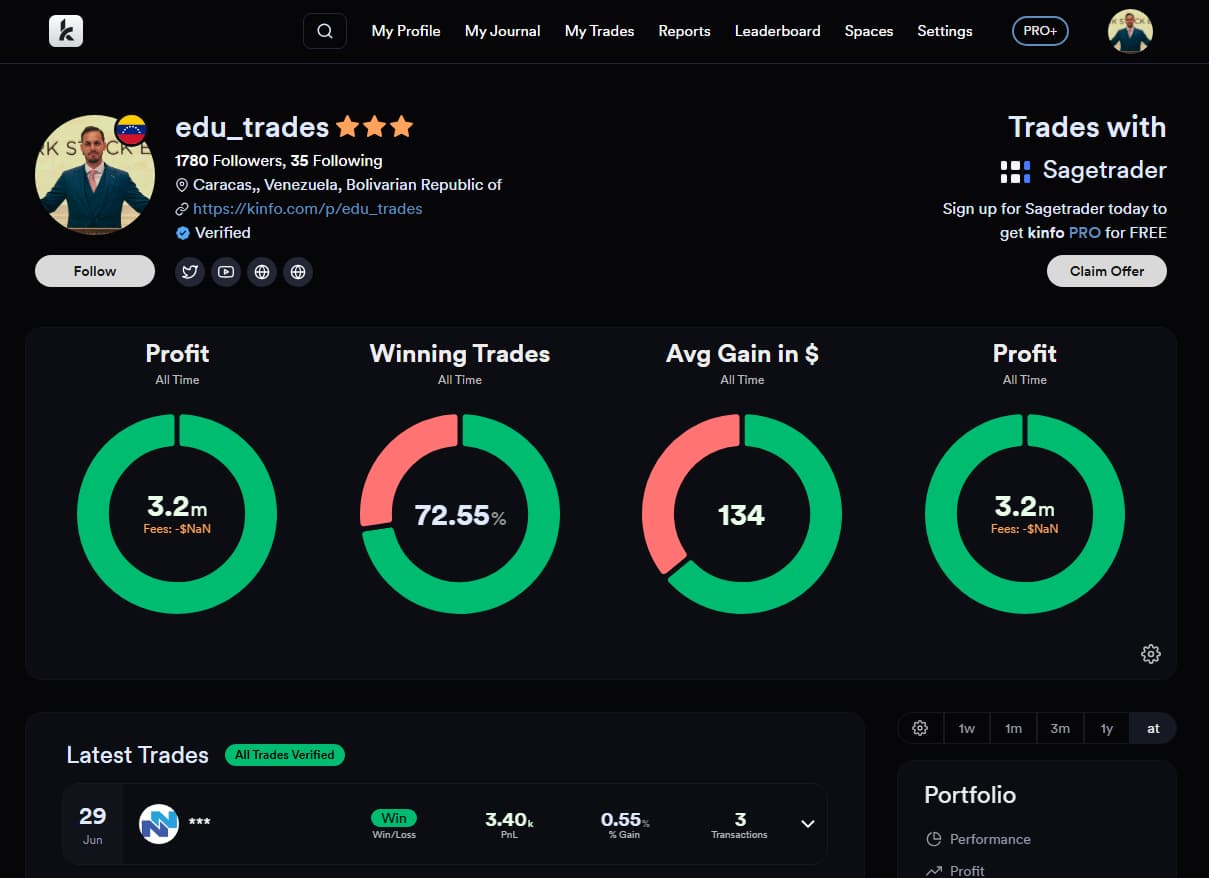
Your public profile displays a “Trades with” panel for the broker, next to a Claim Offer button. Anyone who signs up with that broker through your profile gets kinfo PRO free too, so the people you bring in get the same deal you do. Your verified stats do the work: the recommendation comes from a real, profitable trader rather than an ad.
Get started
Link your broker and switch on the promotion from your settings. Not sure how to connect your broker? The guide walks you through it.
Linking your broker